
English Pronunciation Practice: Say It, Get Scored
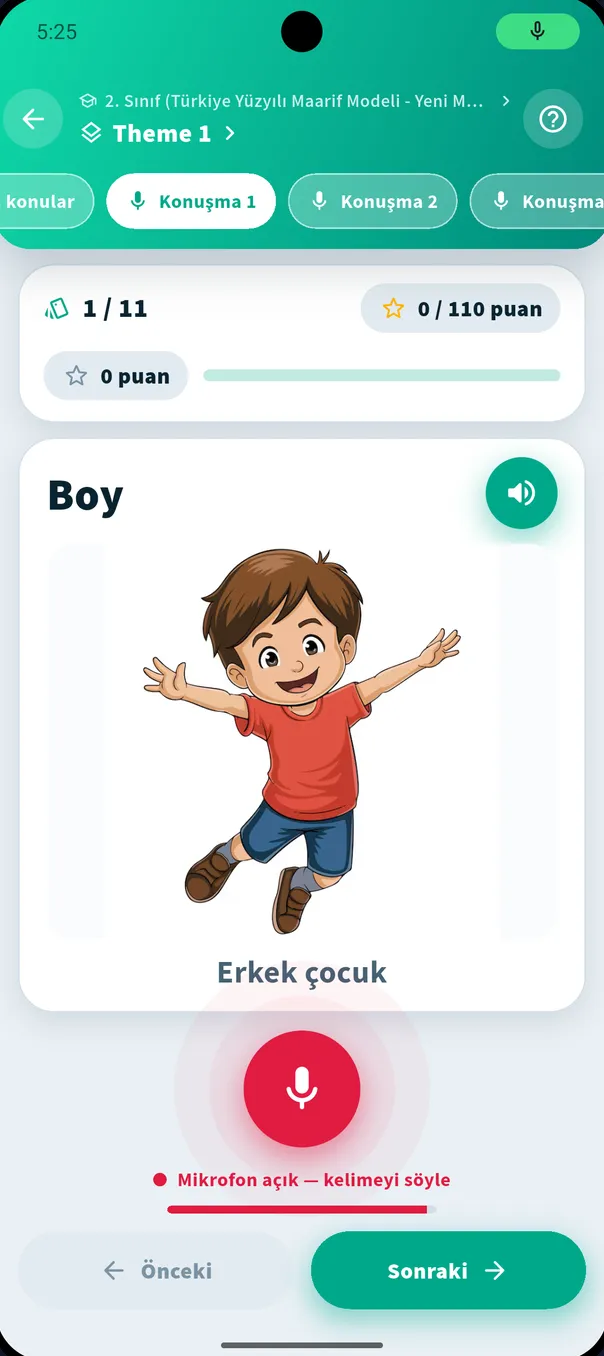
Learn by Speaking (Konuşarak Öğren) is the heart of the app. You hear the word, say it yourself, and speech recognition scores how clearly you said it — instantly.
Learn by Speaking, step by step
- 1
Open a theme
Pick your grade and theme, then open a speaking set in the “Konuşarak Öğren” section.
- 2
Look at the card
The card shows the English word (e.g. “Boy”), its picture and the Turkish meaning (“Erkek çocuk”).
- 3
Listen
Tap the speaker to hear the correct pronunciation. Replay it as often as you like.
- 4
Say it
Tap the red microphone. When you see “Mikrofon açık — kelimeyi söyle” (mic on — say the word), say it clearly at a natural pace.
- 5
Get your score
Once your word is recognised, your score appears. Move on or try again.
How is the score calculated?
The speech recognition service produces a few best guesses for what it heard. If your word matches the first guess, it was understood at its clearest.
- 10
First guess matched
Understood clearly the first time. Perfect!
- 9
Second guess matched
Very close; a small sound difference.
- 8
Third guess matched
Understood, but you can make it a little clearer.
- 0
No match
Listen again and retry. Old scores show in yellow, new ones in green.
No cheating: if the app’s own voice leaks from the speaker into the mic and matches, no points are given.
Sounds Turkish speakers find hard
The sounds that cost the most points are usually ones that don’t exist in Turkish. Listening to and repeating them raises scores quickly.
| Sound | Example | Tip |
|---|---|---|
| th | three, thank you, mother | Tongue tip between the teeth — not “t” or “s”. |
| w | water, window, white | Round the lips; the lower lip doesn’t touch the teeth as in “v”. |
| short/long i | ship – sheep | Hold the long “ee” a little longer. |
| silent letters | knee, write, listen | Not every written letter is spoken; listen first. |
| word stress | TEAcher, baNAna | Say the stressed syllable a little stronger. |
Tips for better results
- Practise somewhere quiet; TV and music confuse recognition.
- Hold the phone 15–25 cm from your mouth and don’t cover the microphone.
- Listen first, then say it with the same rhythm at a natural pace; don’t spell it out.
- Say just the word, once — no “umm” before it.
- On Android, Settings → “Mikrofon kurulumu” (microphone setup) checks the recognition service and permissions.
- No internet? Turn on “Çevrimdışı tanıma” (offline recognition) in Settings (needs the English offline pack; slightly less accurate).
Microphone setup (Android)
Speech recognition uses your phone’s recognition service. The “Microphone setup” card in Settings lists anything missing and fixes it in one tap:
- Is a speech recognition service available?
- Is the Google app installed?
- Is microphone permission granted?
- Is the English offline language pack downloaded?
Pronunciation on the web version
On the web version (speak.quansystem.com) speech recognition depends on the browser: it works in Google Chrome but not in browsers such as Firefox — the other sections still work normally. The microphone setup wizard and offline recognition are not available on the web. That’s why we recommend the mobile app for pronunciation practice.
Mobile or Web?Say your first word today
Download for free, pick your grade, tap the mic in the first theme. The rest feels like a game.
💡 We recommend the mobile app for the full experience.